
Authentication
All API requests to the TRXUp API require authentication using a Bearer token and signature. This ensures the security and integrity of your API requests.
Obtaining API Credentials
To get started with the TRXUp API, you'll need to obtain your API credentials from the dashboard:
- Log in to the TRXUp cabinet
- Open API access, under Account in the sidebar
- Press Create credentials
The token and the signing secret are shown once, at the moment they are created. The secret is never displayed again — not in part, and not to that screen. If you lose it, issue a new pair.
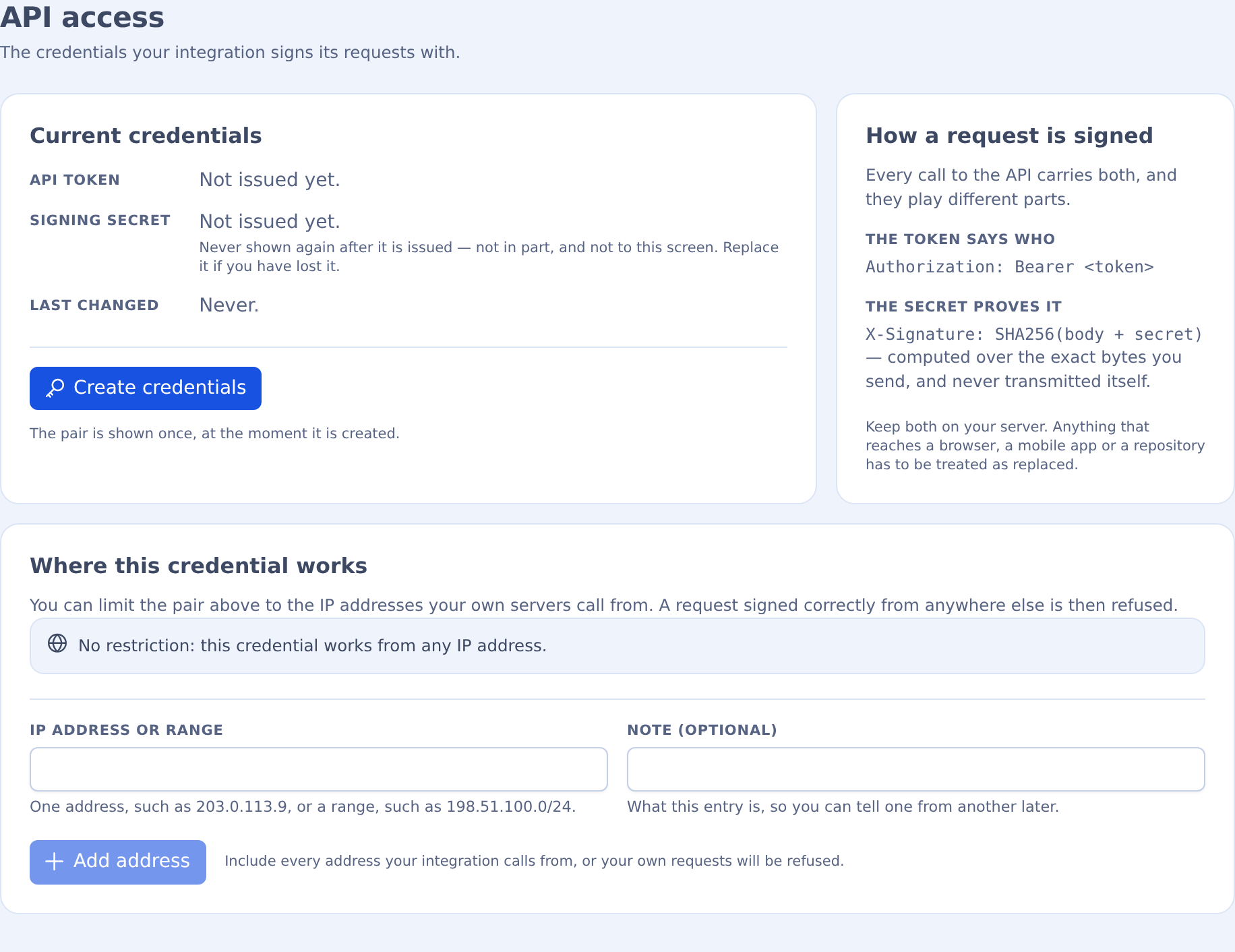
The same screen can restrict the pair to the IP addresses your own servers call from. A correctly signed request from anywhere else is then refused.
TIP
Keep your API credentials secure and never share them publicly. Your API secret should be treated like a password.
Required Headers
| Header | Description |
|---|---|
Authorization: Bearer YOUR_API_TOKEN | Your API token |
X-Signature: YOUR_SIGNATURE | Request signature |
Content-Type: application/json | Content type must be JSON |
Signature Calculation
The signature is calculated using the SHA256 hash of the request body concatenated with your API secret.
signature=$(echo -n "$requestBody$apiSecret" | sha256sum | cut -d' ' -f1)Example in Different Languages
#!/bin/bash
API_TOKEN="your_api_token"
API_SECRET="your_api_secret"
REQUEST_BODY='{"service":"energy","params":{"address":"TRX_ADDRESS","energy_amount":65000,"duration":1}}'

# Calculate signature
SIGNATURE=$(echo -n "${REQUEST_BODY}${API_SECRET}" | sha256sum | cut -d' ' -f1)

# Make API request
curl -X POST "https://api.trxup.com/v1/transaction/new" \
  -H "Authorization: Bearer ${API_TOKEN}" \
  -H "X-Signature: ${SIGNATURE}" \
  -H "Content-Type: application/json" \
-d "${REQUEST_BODY}"const crypto = require('crypto');
const axios = require('axios');
const apiToken = 'your_api_token';
const apiSecret = 'your_api_secret';
const requestBody = JSON.stringify({
service: 'energy',
params: {
address: 'TRX_ADDRESS',
energy_amount: 65000,
duration: 1
}
});
// Calculate signature
const signature = crypto
.createHash('sha256')
.update(requestBody + apiSecret)
.digest('hex');
// Make API request
axios({
method: 'post',
url: 'https://api.trxup.com/v1/transaction/new',
headers: {
'Authorization': `Bearer ${apiToken}`,
'X-Signature': signature,
'Content-Type': 'application/json'
},
data: requestBody
})
.then(response => console.log(response.data))
.catch(error => console.error(error));<?php
$apiToken = 'your_api_token';
$apiSecret = 'your_api_secret';
$requestBody = json_encode([
'service' => 'energy',
'params' => [
'address' => 'TRX_ADDRESS',
'energy_amount' => 65000,
'duration' => 1
]
]);
// Calculate signature
$signature = hash('sha256', $requestBody . $apiSecret);
// Make API request
$ch = curl_init('https://api.trxup.com/v1/transaction/new');
curl_setopt($ch, CURLOPT_RETURNTRANSFER, true);
curl_setopt($ch, CURLOPT_POST, true);
curl_setopt($ch, CURLOPT_POSTFIELDS, $requestBody);
curl_setopt($ch, CURLOPT_HTTPHEADER, [
'Authorization: Bearer ' . $apiToken,
'X-Signature: ' . $signature,
'Content-Type: application/json'
]);
$response = curl_exec($ch);
curl_close($ch);
echo $response;
?>import hashlib
import json
import requests
api_token = 'your_api_token'
api_secret = 'your_api_secret'
request_body = json.dumps({
'service': 'energy',
'params': {
'address': 'TRX_ADDRESS',
'energy_amount': 65000,
'duration': 1
}
})
# Calculate signature
signature = hashlib.sha256((request_body + api_secret).encode()).hexdigest()
# Make API request
headers = {
'Authorization': f'Bearer {api_token}',
'X-Signature': signature,
'Content-Type': 'application/json'
}
response = requests.post(
'https://api.trxup.com/v1/transaction/new',
headers=headers,
data=request_body
)
print(response.json())Signature version 2 (optional)
Signature version 2 is an optional, stronger way to sign the same requests. You opt in per request by sending the X-Signature-Version: 2 header. A request without that header, or with X-Signature-Version: 1, is checked exactly as described above, so existing integrations need no change. Version 1 keeps working and there is no deadline to switch; for new integrations we recommend version 2.
What version 2 adds:
- The signature is bound to the endpoint. The method and path are part of what is signed, so a request signed for
/v1/subscription/checkcannot be replayed to/v1/subscription/stop. - It expires after 5 minutes. The signed timestamp must be within 300 seconds of the server's clock.
- Each signed request is accepted only once. The signed nonce cannot be used again, so a captured request cannot be replayed.
Required Headers (version 2)
| Header | Description |
|---|---|
Authorization: Bearer YOUR_API_TOKEN | Your API token, as in version 1 |
X-Signature-Version: 2 | Selects signature version 2 for this request |
X-Timestamp: 1761040800 | Current Unix time in seconds, as a decimal integer |
X-Nonce: 7f3c9a12b4e8d05c | A unique value for every request: 8–128 characters from A–Z a–z 0–9 . _ ~ - (a UUID or 16+ random hex characters is fine). Never reuse a nonce |
X-Signature: YOUR_SIGNATURE | Request signature, calculated as below |
Content-Type: application/json | Content type must be JSON |
Signature Calculation (version 2)
X-Signature is the lower-case hex HMAC-SHA256 of the following string, with your API secret as the key:
METHOD + "\n" + PATH + "\n" + X-Timestamp + "\n" + X-Nonce + "\n" + BODYMETHODisPOST(every/v1endpoint is POST).PATHis the request path exactly as sent, without the host and without a query string, e.g./v1/transaction/new.X-TimestampandX-Nonceare exactly the values of the headers you send.BODYis the exact raw bytes of the request body (an empty string for an empty body). Sign the bytes you send: if the JSON is serialised again after signing, the signature will not match."\n"is a single line feed (0x0A). There is no line feed after the body.
The server checks the signature first, then that X-Timestamp is at most 300 seconds (5 minutes) away from its own clock in either direction, then that your account has not used the nonce before (nonces are remembered for about 11 minutes). Keep your server's clock synchronised with NTP. A retry is a new request: it needs a new timestamp, a new nonce and a new signature.
Test Vector
Check your code against these values before calling the API:
| Input | Value |
|---|---|
| API secret | your_api_secret |
| Method | POST |
| Path | /v1/transaction/new |
X-Timestamp | 1761040800 |
X-Nonce | 7f3c9a12b4e8d05c |
| Body | {"service":"energy","params":{"address":"TRX_ADDRESS","energy_amount":65000,"duration":1}} |
The string to sign (five lines, no line feed after the last one):
POST
/v1/transaction/new
1761040800
7f3c9a12b4e8d05c
{"service":"energy","params":{"address":"TRX_ADDRESS","energy_amount":65000,"duration":1}}
Expected X-Signature:
56576e1faecaca2b2533bee6124e7ece2b023665addb2f2e79b8ac83bf8104e8Errors (version 2)
A failed check returns the same HTTP 401 response as version 1, with "code": 1. A wrong or missing signature, timestamp or nonce, or an X-Signature-Version other than 1 or 2, gets the usual Incorrect token or signature. Only after a valid signature can two more specific messages appear:
X-Timestamp is N seconds from this server's clock; at most 300 either way is accepted— your clock is off: synchronise it with NTP.This X-Nonce was already used; every request needs a new one— generate a new nonce for every request, including retries.
Version 2 Examples in Different Languages
#!/bin/bash
API_TOKEN="your_api_token"
API_SECRET="your_api_secret"
REQUEST_PATH="/v1/transaction/new"
REQUEST_BODY='{"service":"energy","params":{"address":"TRX_ADDRESS","energy_amount":65000,"duration":1}}'

# A new timestamp and nonce for every request
TIMESTAMP=$(date +%s)
NONCE=$(openssl rand -hex 16)

# Calculate signature: METHOD\nPATH\nTIMESTAMP\nNONCE\nBODY, no trailing newline
SIGNATURE=$(printf '%s\n%s\n%s\n%s\n%s' "POST" "$REQUEST_PATH" "$TIMESTAMP" "$NONCE" "$REQUEST_BODY" \
  | openssl dgst -sha256 -hmac "$API_SECRET" | awk '{print $NF}')

# Make API request
curl -X POST "https://api.trxup.com${REQUEST_PATH}" \
  -H "Authorization: Bearer ${API_TOKEN}" \
  -H "X-Signature-Version: 2" \
  -H "X-Timestamp: ${TIMESTAMP}" \
  -H "X-Nonce: ${NONCE}" \
  -H "X-Signature: ${SIGNATURE}" \
  -H "Content-Type: application/json" \
-d "${REQUEST_BODY}"const crypto = require('crypto');
const axios = require('axios');
const apiToken = 'your_api_token';
const apiSecret = 'your_api_secret';
const requestPath = '/v1/transaction/new';
const requestBody = JSON.stringify({
service: 'energy',
params: {
address: 'TRX_ADDRESS',
energy_amount: 65000,
duration: 1
}
});
// A new timestamp and nonce for every request
const timestamp = Math.floor(Date.now() / 1000).toString();
const nonce = crypto.randomUUID();
// Calculate signature: METHOD\nPATH\nTIMESTAMP\nNONCE\nBODY
const payload = ['POST', requestPath, timestamp, nonce, requestBody].join('\n');
const signature = crypto
.createHmac('sha256', apiSecret)
.update(payload)
.digest('hex');
// Make API request (send exactly the body that was signed)
axios({
method: 'post',
url: 'https://api.trxup.com' + requestPath,
headers: {
'Authorization': `Bearer ${apiToken}`,
'X-Signature-Version': '2',
'X-Timestamp': timestamp,
'X-Nonce': nonce,
'X-Signature': signature,
'Content-Type': 'application/json'
},
data: requestBody
})
.then(response => console.log(response.data))
.catch(error => console.error(error));<?php
$apiToken = 'your_api_token';
$apiSecret = 'your_api_secret';
$requestPath = '/v1/transaction/new';
$requestBody = json_encode([
'service' => 'energy',
'params' => [
'address' => 'TRX_ADDRESS',
'energy_amount' => 65000,
'duration' => 1
]
]);
// A new timestamp and nonce for every request
$timestamp = (string) time();
$nonce = bin2hex(random_bytes(16));
// Calculate signature: METHOD\nPATH\nTIMESTAMP\nNONCE\nBODY
$payload = implode("\n", ['POST', $requestPath, $timestamp, $nonce, $requestBody]);
$signature = hash_hmac('sha256', $payload, $apiSecret);
// Make API request (send exactly the body that was signed)
$ch = curl_init('https://api.trxup.com' . $requestPath);
curl_setopt($ch, CURLOPT_RETURNTRANSFER, true);
curl_setopt($ch, CURLOPT_POST, true);
curl_setopt($ch, CURLOPT_POSTFIELDS, $requestBody);
curl_setopt($ch, CURLOPT_HTTPHEADER, [
'Authorization: Bearer ' . $apiToken,
'X-Signature-Version: 2',
'X-Timestamp: ' . $timestamp,
'X-Nonce: ' . $nonce,
'X-Signature: ' . $signature,
'Content-Type: application/json'
]);
$response = curl_exec($ch);
curl_close($ch);
echo $response;
?>import hashlib
import hmac
import json
import time
import uuid
import requests
api_token = 'your_api_token'
api_secret = 'your_api_secret'
request_path = '/v1/transaction/new'
# Compact separators: the same bytes as the test vector and the other examples
request_body = json.dumps({
'service': 'energy',
'params': {
'address': 'TRX_ADDRESS',
'energy_amount': 65000,
'duration': 1
}
}, separators=(',', ':'))
# A new timestamp and nonce for every request
timestamp = str(int(time.time()))
nonce = uuid.uuid4().hex
# Calculate signature: METHOD\nPATH\nTIMESTAMP\nNONCE\nBODY
payload = '\n'.join(['POST', request_path, timestamp, nonce, request_body])
signature = hmac.new(api_secret.encode(), payload.encode(), hashlib.sha256).hexdigest()
# Make API request (send exactly the bytes that were signed)
headers = {
'Authorization': f'Bearer {api_token}',
'X-Signature-Version': '2',
'X-Timestamp': timestamp,
'X-Nonce': nonce,
'X-Signature': signature,
'Content-Type': 'application/json'
}
response = requests.post(
'https://api.trxup.com' + request_path,
headers=headers,
data=request_body.encode()
)
print(response.json())